Creating a Professional KDP Interior for Your Book: A Step-by-Step Guide
Are you an aspiring author looking to self-publish your first book on Amazon’s Kindle Direct Publishing (KDP) platform? One of the most important aspects of publishing a high-quality book is creating a well-formatted interior. A professional KDP interior ensures your book looks polished, is easy to read, and meets Amazon’s publishing standards. In this guide, we’ll walk you through the process of designing a KDP interior that’s ready to use, tested for accuracy, and optimized for success.
Understanding KDP Interior Design
Before diving into the formatting process, it’s important to understand what a KDP interior entails. The interior of your book includes all the pages between the front and back covers — the title page, table of contents, chapters, and any additional content like appendices or references. Proper formatting ensures the text flows well, is visually appealing, and adheres to Amazon’s formatting guidelines.
Key Features of a Professional KDP Interior
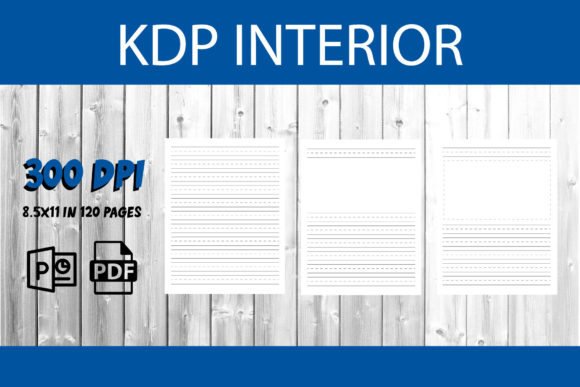
- 8.5x11 inch size: This is a standard size for many paperback books, especially those used in academic or business settings.
- 120 pages: A typical length for short to medium-length nonfiction or novellas.
- Black and white printing: Cost-effective and ideal for text-heavy books.
- With bleed: Ensures that images or background colors extend to the edge of the page without leaving white borders.
- PowerPoint and PDF formats: PowerPoint is great for designing visuals, while PDF ensures the layout remains intact when uploading to KDP.
- Interior only: You’ll need to create your own covers separately, which allows for greater flexibility and design control.
Why Proper Interior Formatting Matters
A well-formatted interior is more than just aesthetics — it directly impacts the reader’s experience. Poor formatting can lead to awkward line breaks, inconsistent spacing, or misaligned text, which can distract readers and reduce the perceived quality of your work.
Additionally, Amazon has specific formatting requirements for KDP submissions. Failing to meet these can result in your book being rejected or appearing incorrectly when printed. Using a tested and ready-to-use template ensures your book is formatted correctly from the start.
Common Formatting Mistakes to Avoid
- Using excessive spacing: Many authors manually add spaces between paragraphs using the Enter key. Instead, use paragraph styles to adjust spacing consistently.
- Incorrect margins: Each book size requires specific margin settings. For 8.5x11 inch books, standard margins are usually around 1 inch on all sides, but this may vary depending on the page count and font size.
- Improper use of headers and footers: These should include page numbers and chapter titles but must not interfere with the main text.
- Unembedded fonts: If you use a special font, make sure it’s embedded in the PDF to prevent it from changing on different devices.
How to Create a Ready-to-Use KDP Interior File
Creating a professional interior involves several steps, from choosing the right tools to final formatting checks. Below is a step-by-step guide to help you create a polished interior using PowerPoint and PDF files.
Step 1: Choose the Right Tools
While many authors use Microsoft Word for formatting, PowerPoint offers more control over layout and design, especially when creating visual elements like chapter headers or sidebars. Additionally, converting your final design to PDF ensures that your formatting remains intact when uploaded to KDP.
Step 2: Set Up Your Document
Open PowerPoint and create a new presentation. Set the slide size to 8.5x11 inches with bleed enabled. Each slide will represent a single page of your book. This allows you to design each page individually while maintaining a consistent layout throughout the book.
Step 3: Design the Title Page and Table of Contents
The title page is the first thing readers see after the cover, so it should be clean and professional. Include the book title, subtitle (if applicable), and your name. The table of contents should follow, listing all chapters and their corresponding page numbers.
Step 4: Format the Body Text
Choose a readable font such as Times New Roman, Garamond, or Georgia for body text. Use 12-point font size with 1.15 line spacing for optimal readability. Apply consistent paragraph styles and avoid using tabs for indentation — use the paragraph settings instead.
Step 5: Add Page Numbers and Headers
Insert page numbers at the bottom or top of each page. If your book has multiple chapters, consider adding chapter titles in the header for easy navigation.
Step 6: Convert to PDF and Check for Errors
Once your interior is complete, save the PowerPoint file as a PDF. Use Adobe Acrobat or a similar tool to check for any formatting issues, such as missing fonts or misaligned text. Make sure all pages are in the correct order and that the bleed area is properly set.
Best Practices for a Successful KDP Interior
Creating a KDP interior isn’t just about following technical guidelines — it’s also about ensuring your book is reader-friendly and professionally presented. Here are some best practices to keep in mind:
- Use a consistent layout: Maintain the same font, spacing, and style throughout the entire book.
- Test your file before publishing: Download a proof copy from KDP to check how your book looks in print.
- Optimize for readability: Avoid overly narrow margins or small fonts that strain the eyes.
- Include front and back matter: Add a copyright page, acknowledgments, and an author bio to give your book a professional finish.
How to Handle Images and Graphics
If your book includes images, charts, or diagrams, make sure they are high resolution (at least 300 DPI) and properly placed within the text. Use the “wrap text” feature in PowerPoint to ensure the text flows around images correctly. Also, remember that KDP only supports black and white interiors for cost-effective printing, so avoid using color images unless you’re opting for a color print version.
Understanding the Role of Interior Design in Book Success
Your book’s interior plays a crucial role in its overall success. Readers expect a professional appearance, especially when purchasing nonfiction or educational content. A well-designed interior builds credibility and enhances the reading experience, which can lead to better reviews and higher sales.
Moreover, a properly formatted book ensures compatibility across different devices and print-on-demand services. Whether your book is read on a Kindle or printed as a physical copy, the interior should look and feel consistent.
Interior Design and Reader Engagement
Believe it or not, the way your book is formatted can affect how engaged readers are with your content. Clean, well-spaced text reduces eye strain and makes it easier for readers to focus on your message. On the other hand, cluttered or poorly formatted text can cause readers to lose interest or even abandon the book altogether.
Final Thoughts: Ready, Set, Publish!
Creating a KDP interior that’s ready to use, tested, and formatted correctly is an essential step in the self-publishing journey. By following the steps outlined in this guide and using tools like PowerPoint and PDF, you can design a professional-looking interior that enhances your book’s readability and appeal.
Remember, the goal is not just to publish a book — it’s to publish a book that readers will enjoy and recommend. A well-formatted interior is one of the best ways to ensure your content shines and your message is delivered with clarity and professionalism.